All Your Jobs in One Place
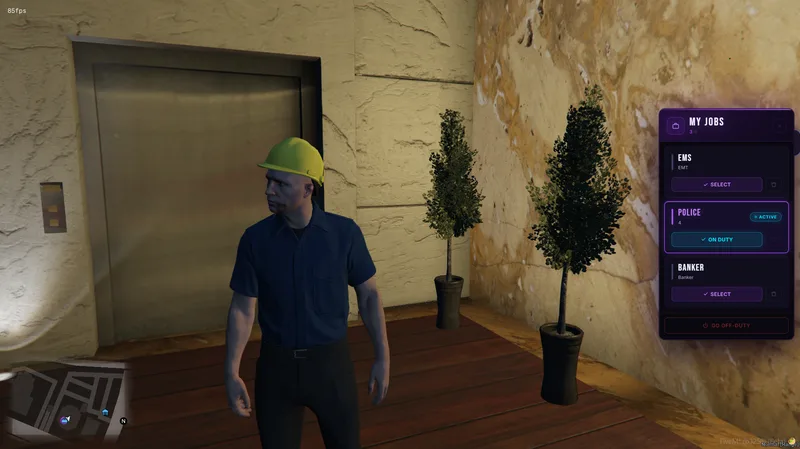
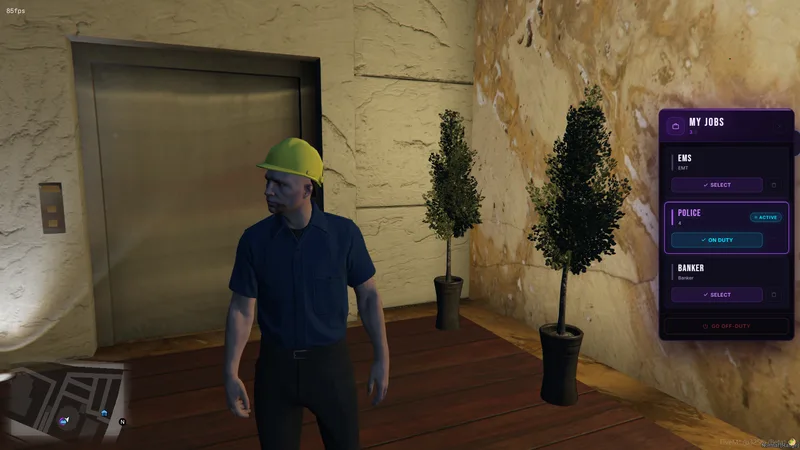
Every job a player gets is saved automatically. Press a key and they see all of them in a single list, with their rank in each one and the job they are currently working clearly highlighted.
Nexus Multi Job is a FiveM multijob script. Why choose just one job? With Nexus Multijob your players keep several jobs at the same time and switch between them in a second, straight from a clean, themeable menu. No more trips back to the job center and no more asking staff to change them over. Works on both ESX and QBCore.
Instant delivery to your Cfx.re account · Cfx.re asset escrow · Free updates
Quick summary · 10 features
Every job a player gets is saved automatically. Press a key and they see all of them in a single list, with their rank in each one and the job they are currently working clearly highlighted.
Mechanic in the morning, taxi driver at night? Pick a job from the list and you are on duty instantly. The menu stays open and refreshes live, so switching feels smooth and natural.
Decide how many jobs each player can hold, and give certain players a higher limit if you want, perfect for VIPs or staff. Players can remove the jobs they no longer need, always with a confirmation so nothing gets deleted by accident. The job they are currently working can't be removed.
Need a break? Players can go off duty from the same menu and come back to any of their jobs whenever they are ready. You can turn this option on or off.
Choose between six colour themes (purple, orange, green, red, blue and gold), rename jobs and ranks the way your community knows them, and pick the notification style that fits your server: native GTA, ESX, QBCore or ox_lib. Players can even change the key that opens the menu from their own FiveM settings.
Players can only switch to jobs they actually earned, and always at the rank they were given. The rank is read from the server, never from the player's side, so the menu can't be used to promote yourself. Staff can add jobs to any player with a simple command.
There are no per-frame loops. The script stays idle until a player opens the menu, so it has no impact on your resource usage the rest of the time.
Buy it here and log in with your Cfx.re account at checkout.
Download it from the Cfx.re portal (Granted Assets) and put the nexus_multijob folder in your resources.
Import nexus_multijob.sql into your database.
Start oxmysql and your framework before nexus_multijob.
Choose your framework, language, maximum jobs and theme in config.lua.
Add ensure nexus_multijob to your server.cfg and restart.
Full configuration in the documentation.
Yes, both are supported. You just choose your framework in the config.
Six by default, but you decide. You can also give specific players their own limit.
Yes. It opens with F5 by default, and every player can change it in their FiveM key bindings.
No. The rank is always the one saved on the server for that job.
Yes, with the `/njgive` command.
It comes in English by default and includes Spanish, German, French, Italian, Portuguese and Chinese. You choose the language in the config.
No. The script stays idle until a player opens the menu.
Yes, it uses the official FiveM escrow. The config, texts and menu stay open so you can customise them.
All FiveM scriptsFiveM ESX scriptsFiveM QBCore scriptsFiveM job scripts